April’s updates help you see when patient progress is truly meaningful, track smaller gains with more precision, and apply billing rules as you document. The result is clearer decisions, more accurate documentation, and fewer moments of second-guessing.
Erika Lee is a Product Analyst at Prompt Health, serving as the team's Lead Tracking & Benefits Verification lead, FLR and Documentation Measurements lead, and Pendo subject matter expert.
Somewhere between your 3rd patient and reheating your coffee for the 3rd time, you’re looking at outcome scores and thinking, this is progress… but is it meaningful?.
There’s usually no time to sit with that question.
This month’s updates help answer it as you go.
You’ll see when progress actually counts, capture smaller gains, and rely on built-in guardrails that keep everything moving. Experience more confidence in the moment…and less double-checking yourself.
What's new in Prompt's April 2026 release? The biggest updates, at a glance
See when progress reaches meaningful thresholds
Track goal progress with precise percentage inputs
Apply payer rules by provider type
Get real-time CPT and modifier guidance during documentation
Access a full library of ready-to-use templates
See when patient progress actually counts
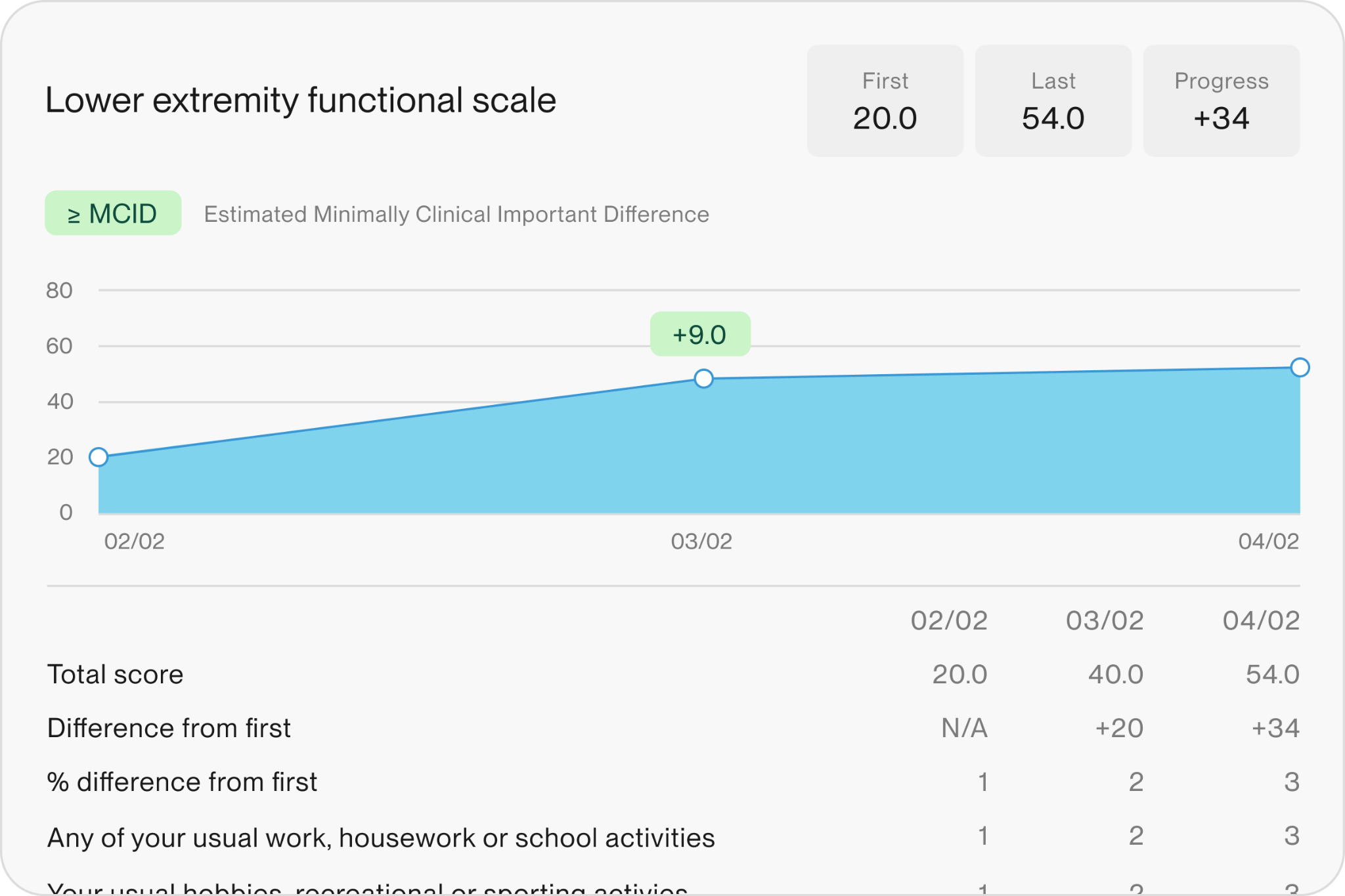
Outcome scores tell a story. Now, you can see when that story reaches a meaningful turning point.
Estimated MCID (Minimally Clinically Important Difference) markers appear on the progress graph to highlight when improvement crosses a clinically meaningful threshold. The signal is built into your workflow, so you can recognize meaningful progress as you go.
What you’ll notice:
Clear markers for meaningful patient improvement
Faster interpretation of outcome trends
More confident clinical decisions
Stronger support for care plans
Track progress with more precision
Not all progress shows up in big milestones. Now, you can capture the smaller wins along the way.
With flexible percentage entry, quick adjustments, and familiar quick selects, you can reflect patient progress more accurately in every visit.
What you’ll notice:
More precise patient progress tracking
Better visibility into small improvements
Clearer documentation across visits
Stronger justification for continued care
Set billing rules by provider type
Every provider type works differently. Now, your payer rules can reflect that.
Create CPT code blocks and modifier alerts by provider type at the payer or payer type level. Rules apply automatically during documentation, so billing aligns with how each discipline delivers care.
What you’ll notice:
Fewer claim rejections from incorrect coding
Real-time guidance during documentation
More consistent modifier usage across provider types
Less rework between clinical and billing teams
Access a full library of proven templates
You’ve always had templates to start with. Now, you have a full library to pull from anytime.
The Prompt Default Template Library gives you ongoing access to standardized goals, text, tables, and scheduling templates built by the Prompt team. Import what you need and use or adapt it right away.
What you’ll notice:
Faster access to high-quality templates
More consistent documentation across your team
Less time spent rebuilding templates
Easier rollout of new standards
How we release and why it matters
Prompt ships updates regularly, so improvements show up while they’re still useful in your day-to-day work.
This month’s updates focus on clarity in the moment. Clear progress, clearer documentation, and fewer second guesses, all inside the workflows you already use.
FAQs
What are MCID markers showing?
They highlight when a patient’s outcome score crosses a clinically meaningful threshold, so you can quickly see when progress truly counts.
Do I still need to interpret outcome scores?
Yes. The markers support your judgment by showing when progress reaches a meaningful level, but clinical decisions remain in your hands.
Can I still use quick select options for goal progress?
Yes. Quick selects are still available alongside manual percentage entry and small increment adjustments.
How do provider type billing rules work?
You can set CPT blocks and modifier alerts by provider type at the payer or payer type level. These rules apply automatically during documentation.
What is the Prompt Default Template Library?
It’s a centralized library of templates created by the Prompt team that you can import into your site anytime and adapt to your workflow.
Subscribe for updates
Get practice growth tips delivered right to your inbox
Thank you! Your submission has been received!
Oops! Something went wrong while submitting the form.
By submitting your information, you agree to Prompt's Privacy Policy. You can opt out anytime.






.png)
%20copy.png)
.png)
.png)
.png)
.png)