May's updates let your team start documentation from a mobile app, schedule bookable clinic resources, and collect overdue balances at check-in before the visit starts. Less manual work in the background means more focus where it counts.
Erika Lee is a Product Analyst at Prompt Health, serving as the team's Lead Tracking & Benefits Verification lead, FLR and Documentation Measurements lead, and Pendo subject matter expert.
Between documenting after a full caseload, chasing down balances, and rescheduling the patient who canceled at 7:58 AM, the clinic day fills up before it even starts. You know the feeling...
Prompt's got you covered. New this month: a new mobile documentation app, smarter resource scheduling, bulk billing tools, and more. Less clicking around. More getting things done.
What's new in Prompt's May 2026 release? The biggest updates, at a glance
Record patient encounters and use AskAI from your phone
Schedule bookable rooms and equipment
Lock in full plans of care with bulk scheduling
Collect overdue balances at Kiosk check-in
Apply bulk write-offs to patient balances
Automate outcomes survey delivery by visit count
Control patient chart access by facility
See normative range of motion (ROM) values while documenting
1) Document on the go with Prompt Sidekick
Notes don't always get finished at a desk. They pile up between patients, or wait until after the last visit of the day.
The new Prompt Sidekick mobile app lets your team record patient encounters and use AskAI (HIPAA-compliant chatbot) directly from a phone. Notes move faster. The end-of-day stack gets smaller.
What you'll notice:
Faster note completion from anywhere in the clinic
AskAI access without returning to a workstation
More time face time with the patient, less time at a screen
2) Schedule rooms and equipment without guesswork
Double-bookings for shared resources happen when there’s no visibility into what’s available. A provider walks into a treatment room that’s already in use, or 2 patients are scheduled on the same piece of equipment.
Version 10.1 adds bookable clinic resources to your schedule. Configure rooms, specialized equipment, and aide time with provider types that can use them and the fee to apply when booked. Availability is visible before anything gets scheduled.
What you'll notice:
No double-bookings for shared rooms or equipment
Accurate resource availability on the schedule
Correct default charges applied automatically
3) Lock in full plans of care with bulk scheduling
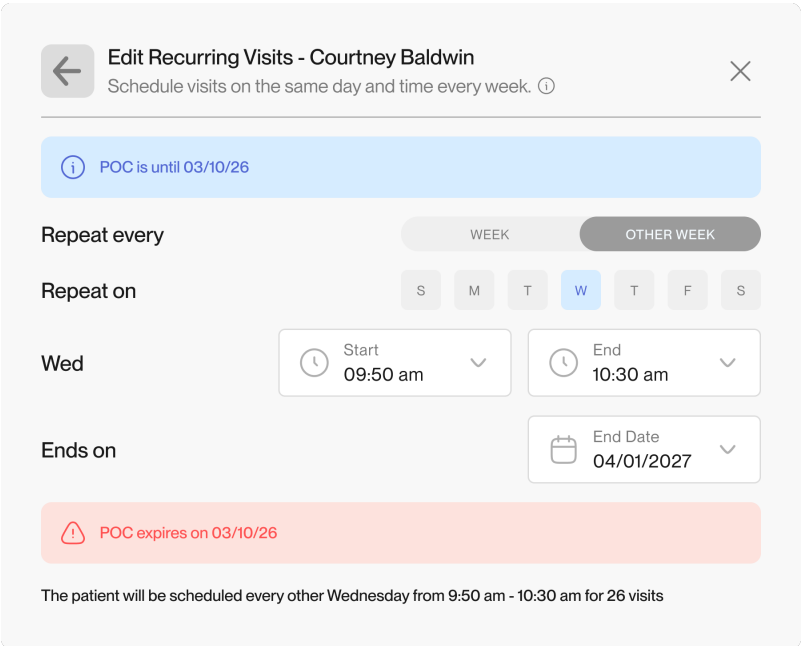
Booking a patient's full plan of care one appointment at a time is slow work. For a pediatric patient seen 3 times a week for 12 weeks, that's 36 individual clicks to schedule and 36 more if anything changes.
You can now bulk schedule recurring weekly or bi-weekly visit series in one step. Locking in a patient's preferred time slots early reduces drop-off, secures long-term patient volume, and turns a 30-minute scheduling task into seconds of predictable revenue on the books.
What you'll notice:
Patient preferred time slots locked in early
Fewer scheduling gaps from delayed booking
Less admin time spent scheduling recurring visits
4) Collect overdue balances before the visit starts
Collecting a balance before care begins is easier than chasing it down afterward.
You can now require patients with overdue balances to pay before completing self check in (powered by Prompt Kiosk). The balance is resolved before care begins.
What you'll notice:
Overdue balances addressed at check-in, not after
Fewer post-visit collection steps for front office
Consistent payment collection before each visit
5) Apply bulk write-offs without clicking through every balance
When you need to reduce what patients owe, whether that’s a flat-dollar discount or a percentage adjustment, doing it one account at a time is slow.
You can now apply write-offs across multiple balances at once. Reason codes (the label that tracks why a balance was reduced) also now support up to 5 characters across both single and bulk adjustments, giving your team a cleaner audit trail.
What you'll notice:
Bulk adjustments across multiple balances in one action
Clearer visibility into why revenue is being written off
Less manual work during high-volume adjustments
6) Automate outcomes survey delivery
Outcome surveys (the standardized questionnaires patients complete to measure their progress) generate the data insurers need to justify ongoing care. Sending them consistently matters.
You can now set surveys to send automatically based on visit count since the last completed survey. Consistent data collection happens in the background.
What you'll notice:
Automated survey delivery based on visit intervals
More complete outcomes data without manual tracking
Consistent documentation supporting medical necessity
7) Control chart access by facility
When staff at one facility can access charts from another, it can create privacy and HIPAA concerns.
New company-level settings let you limit patient chart access by facility. You can prevent all out-of-facility access, or allow temporary access with a logged record of who viewed what and when.
What you'll notice:
Controlled chart access outside a patient's assigned facility
A clear audit trail when limited access is permitted
Stronger privacy controls across locations
8) See normative ROM values while you document
When a patient’s range of motion (ROM) is within normal limits, clinicians still need to know what "normal" is before charting it.
ROM normative values now appear directly in documentation. Click into any measurement field and the reference values are right there. No lookup required.
What you'll notice:
Reference normative values without leaving the chart
Faster documentation for patients with typical ROM findings
9) Capture non-patient time on your schedule more precisely
Staff meetings, admin blocks, and evaluation holds can all look the same on the schedule, making it hard to see how a provider's time is actually being used.
You can now create custom visit types for non-patient time at the facility level. Each type gets its own name, color, emoji, and capacity setting, so your team has a clear picture of the full day.
What you'll notice:
Non-patient time visible on the schedule alongside patient visits
Deeper insight into how provider time is being used
Provider availability accurately reflected when admin time is blocked
10) Gather deeper pediatric insights with pediatric-specific intake questions
Pediatric evaluations are complex. Providers need a detailed history prior to a visit so they can focus more on patient care during evaluations.
The Prompt Pediatric Intake now includes fields designed for high-complexity pediatric cases. Guardian and guarantor details (the person financially responsible for the account), custody arrangements, specialist history, and school-related context are captured during intake. Your team arrives at the evaluation prepared.
What you'll notice:
More complete clinical history before the evaluation begins
Guardian and guarantor details captured upfront, reducing billing delays downstream
Less documentation burden on clinicians during the visit
How we release and why it matters
Prompt ships updates on a regular schedule, typically every 2 weeks, so improvements reach your practice quickly.
May's releases focus on reducing the manual work that fills the edges of your day, from documentation to scheduling to billing. Less friction in the background means more bandwidth for patient care.
FAQs
Which updates help front office teams the most?
Bulk recurring scheduling and the kiosk outstanding payment requirement remove 2 of the most repetitive front office tasks: booking visit series one at a time and chasing down balances after the visit.
Which updates help billing teams the most?
Bulk write-offs and standardized write-off reason codes reduce manual entry and improve bad debt tracking across both single and bulk adjustments.
Can Schedule by Resource support split-session workflows?
Teams using a provider/aide model can set up aide time as a dedicated resource on the schedule. The primary provider's calendar reflects only billable time, while the aide's scheduled time with patients stays visible and organized.
Does the Prompt Sidekick app replace logging into Prompt?
No. Sidekick works alongside Prompt. Recordings made on the mobile app sync back to Prompt, where providers review and finalize notes.
Can Other/Personal visit types affect how provider capacity is reported?
Yes. Each visit type has its own capacity setting. You can configure it to use no capacity, one slot, or all capacity, so your schedule and reporting reflect exactly how that time should be counted.
Subscribe for updates
Get practice growth tips delivered right to your inbox
Thank you! Your submission has been received!
Oops! Something went wrong while submitting the form.
By submitting your information, you agree to Prompt's Privacy Policy. You can opt out anytime.






.png)
.png)
.png)
.png)
.png)
.png)