


Transcript
Kevin: [00:00:00] All right. Hello, everyone. Welcome to our webinar with Prompt Health. Uh, really excited to spend, uh, the next little bit with everyone, um, and just talking a little bit about revenue and, um, where a lot of practices see some, some leakage and, and how you can maybe or some things that you can do to avoid that.
Um, first, I want to take some time to introduce, um, our panelists today. Uh, we have our VP of AI engineering, uh, Pedro, uh, Texeira. Um, we have our product manager, uh, Emily Kelly. Um, she focuses specifically on product updates, um, for all of you, all of our chiropractors and office managers of chiropractic clinics.
Uh, and then we also have our lead, uh, client success manager, uh, Dr. Shelby Waldman, uh, who works closely with, um, the chiropractic clinics, the doctors, office managers and staff, uh, once they onboard and even after onboarding. Um, my name is Kevin. I'm gonna be the moderator today, um, and asking, uh, some questions here.
Uh, I have been in this industry since about two thousand and fourteen. I've been working with chiropractic clinics for twelve years, um, specifically on EHRs, helping them, um, throughout the process of making a decision on an EHR and then following, uh, through with them through, you know, onboarding and, and, you know, seeing how they interact with EHRs on a daily basis.
So I'm really excited to be here and have this conversation, uh, today. So [00:01:30] to frame our discussion a little bit, um, you know, when revenue drops, practices oft-often assume that they just need more patients. Um, we all know that insurance, um, you know, you only get paid so much from insurance. And so the initial thought is, well, we just need to see a higher volume, higher volume, um, and see more patients.
But revenue can also slip through the cracks, you know, through documentation, billing, collections, um, and then care plan follow-through. So today, we're gonna discuss where those gaps occur and how to address them, and how AI and automation in this recent world of, of AI and technology can, you know, help you out with that.
Um, so Pedro, I wanted to start with you. Um, a lot of chiropractors already delegate their documentation tasks to their staff members, whether it's through the, the very popular long time travel cards, um, or just preparing portions of their note before they even see the patient. Um, how is AI another tool for doing this?
Um, and how is that different from automation that can also be built within an EHR?
Pedro: Well, so I really like that you mentioned delegation because it's a skill that you learn by becoming an expert in a field, right? So, like, you can't delegate a task and know that it's getting done well unless you really know how to do that and you know also how to run a team.
And so one of the questions or, I think, fears that a lot of clinicians and practice owners sort of voice to us is, "Oh, I don't [00:03:00] want the AI to take over," or, "I don't want it to, uh, make me feel like I'm, I'm not being useful," right? Or, "I'm not operating as, like, an ex- expert in my field." Well, AI is much more like something that you are delegating to, similar to an employee or a team member.
And so expert use of AI requires expertise in a field and also learning those delegation abilities. So I figured I'd address that, but also help people understand that getting really good at AI is not gonna be something that's gonna take away your expertise. Uh, it's usually actually gonna sort of hone it, because the stuff that's left over for you to do is not gonna be the easy stuff to delegate.
Kevin: Mm-hmm.
Pedro: Right? So you delegate something to a team member, they come back, they're usually gonna come back with the hairiest possible problems, and you're gonna have to use that expertise even more. Now-
Kevin: Yeah.
Pedro: And you also mentioned the automation piece, right? And that's also a really critical sort of foundation for us to maybe lay down here at the beginning of this me- this, this chat, right, this webinar, which is that not everything needs to be AI.
If it is a rule, like if you do this, then do that, right? If you see this, to do that. Anything that's like an obvious rule that 100% of the time should be done the same way, think automation, think rules. But if it's like I'm gonna pick up the phone and I have no idea what the patient might say, right, that's something now where the AI is gonna come in handy because it's gonna allow you to sort of describe a situation, but it, it's not precise because you don't always know what's gonna happen in the real world.
So hopefully that's a, a way to [00:04:30] people make the distinction between automation and when it's actually worth using AI.
Kevin: Yeah, that's a really good point because I think we see, you know, on billboards, every commercial, AI is everywhere. And so, you know, it's often that we talk to, um, you know, providers that are a little bit nervous about AI.
You know, AI is taking over the world. We don't want AI. Um, a- and I love how you differentiate AI from automation. Um, and I think both are key, and you don't always wanna use AI when you don't need it. You know? Like one plus one is always gonna equal two. You don't need AI to help you with something like that.
Pedro: Exactly.
Kevin: Um, so with that in mind, I, I wanna launch a poll because I wanna see a little bit of the audience here and what they're using. Um, so we're really curious how many of you are already using some form of AI for documentation. So that poll's gonna come up. Just let us know if it's something that you're using today or if you're evaluating it, um, or if you're not interested at all.
Um, and that's okay. So let us know, and, um, it's, it's good for us to see. Um, Shelby, I wanna talk to you a little bit about, since you're a chiropractor and you're helping out, um, our, our chiropractic customers on a daily basis, you practice yourself, um, what are some of the biggest, um, documentation challenges that you've experienced and, um, those compliance gaps that you see [00:06:00] practices struggling with today?
Shelby: Yeah. So I think for me, um, the biggest challenge when I was practicing was just, like, that overwhelming burden of documentation in a high volume environment. So when you're treating patients in that environment, the actual, like, treatment or adjustment, like, happens in seconds. Like, we find it, and we fix it, and we move on.
Um, so it just... It's just not realistic to stop and document all of that in real time. So, and even if I did have a break between patients, I'm like, have a mountain of, like, authorizations I need to catch up on, or I need to deal with, like, that front desk issue that happened- Mm-hmm ... a couple minutes ago. So I would- Mm-hmm
end up doing my charts, like, at night or on the weekends, um, which was really just a recipe for burnout. Um, and I-- Like, a lot of clients that come to Prompt are really just in similar situations. And so to save time, they end up relying really heavily on, like, copy forward or, like, same as last treatment functions in their EMR, um, which is super efficient, but over time, the records become really, like, copy stable from visit to visit.
And so to an auditor, that either looks like, you know, a lack of patient progression or a lack of clinical reasoning. Um, so that can be a red flag. Um, then another, like, trend that I see is just a gap in establishing clear medical necessity on each visit. So, you know, if you're adjusting a segment, the daily note has to [00:07:30] justify why that specific region required care that day.
And so if that's missing, you are inadvertently exposing yourselves to risk, like, in the event of an audit. So with Prompt, we have built-in guardrails so that we're able to kind of balance efficiency and compliance with workflows that make it, you know, easy to document that medical necessity.
Kevin: I love that.
Yeah, I remember when the, the SALT feature or that idea kind of first came out and, and it was very helpful for efficiency because as chiropractors, you know, you guys are seeing so many patients, and so you need a way to quickly document. But like you said, over time, the accuracy kind of falls off on what's actually happen-happening during that visit.
Um, so I love that insight. Thank you very much. Um, Pedro, I want to do something. I'm gonna share my screen. You helped create what we call today Sidekick, which is our AI documentation tool. So I want to share my screen, but I want you to talk through a little bit about what the AI is doing on the back end.
Um, and then along with that, the Ask AI section as well and what that is. So just give me a second to pull up my screen. Let me know when you guys can see it. Looks good. We're good? Cool. So for the sake of time, I didn't run through a full conversation between a doctor and a patient. Um, if you want to actually see how it happens, we're happy to show you.
Um, [00:09:00] I uploaded the recording of a conversation I did earlier today, and it's pulling the recommendations into the note. But Pedro, I'll give it to you and, and I'll kind of drive here. Let me know if you want me to go to an area, some area or another. But tell me about the AI and what's happening on the back end here.
Pedro: Yeah. So if you wouldn't mind, there's that little arrow. So sh- you wiggle the Sidekick widget. So something that's really special about Sidekick and Prompt is that it's baked right in. Um, and so you have this little widget, and he expanded it so you can see clearly. There's two buttons for you to worry about, an auto note and a dictation button.
Uh, and you can move that little widget around all you want. And once you get used to it, you can collapse it down and it's just a small little thing, right, with those two different buttons. And the-- everybody's favorite feature that, that's gotten to use Sidekick and, and get comfortable with it is that auto note button.
So you see the two little people symbol is because you're gonna go in, you're gonna talk to that patient, maybe your initial eval, maybe, maybe a daily, you know, or a follow-up visit, and you're just hitting that at the start and talking to the person in front of you And it's just gonna listen in to that conversation.
It'll filter out small talk or other sort of random things. And when you hit stop, within a few seconds, it populates right into Prompt inside of these little blue boxes. So you all see there in the middle, little plus icons, uh, those are the ability to add sentence by sentence. Um, and at the very bottom, you see an Add all button.
What we wanted to do there is make it really easy for you to just get the results, and you don't have to accept any of them. And if you don't accept any of them, they're [00:10:30] not in your note. But if you just remember to start and then stop it at the end of your chat with your patient, and you can start and stop as many times as you want, you can see that it's gonna go ahead and try to draft an entire note automatically, hence the AutoNote.
Um, and so, you know, in the, in the early phase, or if you're thinking about trying it out, uh, it's again, very easy, very low risk. Just put it running, see what it has, and you might like the results. You might think they could be better, and you can very easily edit or tweak them. Uh, or again, do another recording and share some more information and it'll be able to, uh, populate.
So with, uh, honestly, a handful of clicks, some people are able to write a very thorough initial evaluation, um, and it's again, integrated right into Prompt, including the objective data. So here it came in as text. Some people really like those structured fields. Uh, you can flip a single switch, and it'll actually populate in all those parts of the EMR, uh, separately.
Now, behind the scenes, we have potentially dozens of AI calls that happen, accuracy checks. We're always looking for feedback and reviewing, uh, to make it better. But trying to give you a very simple, very easy-to-use tool baked right into, uh, Prompt, um, and, uh, hopefully, you know, that, that comes across there as something that you can just try out very easily.
The one other feature I'll point out here, that Smart Rewrite button. Um, if you go to maybe that first one, uh, you know, you can just hit that. And again, you might have a previous version of your note or a draft or something. The Smart Rewrite is gonna keep it factually very aligned to what it was, uh, but make it possible to get a new [00:12:00] custom-written version, which will also integrate in any notes or results that you threw in from Sidekick there.
So if you're ever worried about, from a compliance perspective, having that copy forward again and again and again and then potentially getting flagged and in trouble, you have a one-click option there. Uh, if it does perhaps seem to you to be a little bit too close to last time, a very quick way to kinda rewrite it and incorporate in some new information very, uh, easily.
So I'll, I'll pause there, Kevin. What, what do you think?
Kevin: Yeah, I love that. I love hearing you walk through it. Um, something that you briefly mentioned that I wanna really highlight is adding multiple recordings on top of each other. I've heard, um, from multiple providers who are using an AI dictation tool, um, that they get one chance, they record it, and then they're spending more time trying to fix the note that came out versus being able to layer on multiple recordings and conversations to really finalize your note.
I don't know if there's anything else you wanna add there, but it's something that I love about Sidekick because your first version of it may not be perfect and you wanna-- or you forgot something and you wanna add to it, you can continue to layer on those conversations.
Pedro: Yeah. And each time that it rerun, it's gonna rewrite the entire thing, right?
Because, again, something, your subjective might change slightly depending on something that you've learned later on in that, uh, visit. And since we're talking to Chiro, uh, chiropractors, uh, if you wouldn't mind, delete that assessment, and then there's that little, little stars draft section right there. Uh, that little button is, um, is one other, uh, cool thing because, again, [00:13:30] you might not remember to hit the record button.
You might not want to hit the record button for some visit types. Uh, we have the Smart Draft button, which will use whatever it has available to potentially draft you a version. And you can hit that as many times as you want. You know, you can revamp, you can ignore. Uh, really, you're welcome to play with it.
There's a lot of advanced features we have, like, uh, mobile app integration, custom instructions, et cetera. I won't, you know, go into too much detail, but if folks are interested, I always love nerding out about this and, and sharing all the cool things that you can do as a, uh, um, a practicing clinician. But, you know, hopefully that's a good crash course.
Kevin: Yeah. And, and before I spend too much time on here, and if you guys wanna see more of this, you know, we can definitely, um, show you in, in one-on-one demonstrations. But talk to me a little bit about the Ask AI and what this does because this is something else that providers, um, find very helpful. And this, in my opinion, is a, is a big reason why I think we call it Sidekick.
Mm-hmm. Um, but talk to me a little bit about what Ask AI does.
Pedro: So I saw that a lot of folks on here are using some sort of AI tool. So I bet a lot of folks here are potentially using stuff like ChatGPT or Claude. Uh, one of the risks there is that they're not, uh, HIPAA compliant unless you jump through a bunch of hoops and sometimes have to pay a, a good bit extra.
You have here a chat tool baked right into Prompt that can see this current note. Um, so, um, if you would actually, uh, you could click on the special test for this patient or write summarize this patient so far or this visit, uh, as an example. But [00:15:00] this is like a HIPAA-compliant ChatGPT baked right in that can see the screen, it can see the note.
Uh, if you've done a recording, it's aware of the transcript. So there's a lot of cool things that you can do in here, uh, brainstorming, you know, interventions, asking quick clinical questions about, uh, things, writing up a letter of medical necessity, perhaps, right, for this patient, taking that into account.
And you can take this content and print it, copy-paste it, put it into the note. But again, just another tool that we've baked in with that HIPAA compliance, with that sidekick, uh, awareness and integration right into Prompt. Uh, then, you know, here for a good example, like a bunch of special test options for this, this type of patient, because again, it's aware of the patient on the screen.
Uh, we're always adding new functionalities here too, but again, it's kinda nice to just have something like this, uh, right in your EMR.
Kevin: I love this. This is amazing. Um, my favorite tool within the system, so great job with this, Pedro. I appreciate you kind of walking us through it. Um, I'm gonna stop my-
Pedro: It's a great
Kevin: team.
Yeah. Um- Very
Pedro: good team. I, uh, we really, really, really appreciate our engineers here.
Kevin: They're a phenomenal team. Um, so yeah, that, that's a big way that, um, I think providers are spending less time documenting while also maintaining, you know, some accurate and compliant notes. Um, but from here I wanna transition a little bit more onto the billing and coding side.
Um, Shelby, I wanna talk to you a little bit about this. Um, how does Prompt connect documentation and billing to help chiropractors catch these issues before claims go out? [00:16:30]
Shelby: Yeah. So what I see a lot of times is the clients are using disconnected systems. So when the documentation and the billing are not linked, it creates this like massive invisible wall.
So then the doctor is performing an extra service, so they did a re-exam today, or they did a modality, and they put it in their note, but they forget to add the charge. Um, or the biller's working out of a separate system, and so they're just trying to get paid, so they might add a diagnosis code or a modifier just to get that claim, you know, to process.
The clinic owner thinks everything's great because they're getting paid, but in a retrospective audit, like that's gonna be, you know, an automatic clawback. And so if your systems don't talk, you're either like leaking revenue from missed codes, or you're putting yourself at risk because your claims don't match your documentation.
So that's something that we take like really seriously at Prompt. Um, and so Prompt has intrinsically linked the documentation and the billing. So when the provider is putting in the documentation, when they're going through checkout, there are payer rules and automated alerts that pop up right when they're getting ready to sign the note, so nothing is missed.
It's checking for modifiers. It's checking for codes that don't match, um, any authorization limits, and all of that's happening like before the claim ever leaves the building. So it really makes compliance a lot simpler so that you're catching those errors in real time instead of paying for them for months later.
Um, and I have [00:18:00] a lot of clients that find that like once Prompt is up and running, they're improving their margins, um, from both a staffing perspective and then also just a reduction in claim denials.
Kevin: I love that. Thank you. Yeah, having worked with, um, you know, chiropractors for so many years, I've seen a lot of practices outsource billing because chiropractors didn't go to school to, to be billers.
You know, they wanna treat patients. Um, and outsourcing billing is great, but what happens is that sometimes you lose some visibility into what's going on behind the scenes, and that's your revenue, so it can be a little bit scary. When your system isn't connected to your clearing house, your billing, um, you, you lose a lot of visibility.
And some systems may even say they integrate with a clearing house, and a lot of times what that means is really there's just a click of the button and it, and it pushes your claims out, and then your ERAs come back. But it's that whole middle ground of, like, what's going on, you know, with, with my, with my claims while it's in the, in the clearing house.
So we try to provide a lot more visibility. It's better. It helps, um, your, your billers, outsourced billers communicate with you in the office. Or if you're bringing billing in-house, it helps communicate and your, your staff inside the house kind of, um, operate a little bit clearer, um, in the billing aspect of it.
Um, Emily, wanna, wanna bring this to you as well. Um, how does having documentation and billing connected, um, make it easier for [00:19:30] chiropractors-- for the practices, kind of on the same note, to manage the billing in-house?
Emily: Yeah. It's, it kind of brings what Shelby said and what Pedro said together in kind of full circle.
Um, and so just a couple points to note there. Just gonna reemphasize first what Shelby said of, like, if you have disparate systems, having a human ca- literally carry a card from one person to another, it, it's like a... There's even physical distance there. That's, it, it's a, like a physical leakage point, you could, you could say.
There's forgetting, the card could get lost, the ink runs, who knows? The ink literally leaks. Um, but there's... Any time a human has to remember and do something, um, there's, there's always risk of, of error. And then just as Shelby noted, that could come through a revenue leak because, um, you get denials or you didn't get paid for something you did.
Maybe you get a clawback in an audit. Um, and then back to what Pedro said, if everything is in one system, and that system can simply use rules, you don't have to rely on humans, you can just rely on logic, because a lot of these payer rules, the modifiers, they are just that. They are logic. Now, what a lot of, um, [00:21:00] chiropractic clinics have relied on is the knowledge of, of a human biller to remember all of that and to go through every claim.
And where the revenue kind of leaks there is, we don't talk about this a lot, but that's a lot of time spent. That's production cost, and a human going through and doing something that automation could do, and not the best use of a, of a human brain that is capable of so much more and more complex work.
Um, and so what Prompt is able to do when it's all in one single system is bring the information to the right person at the right time. And so if a modifier needs to get applied or a payer rule, some kind of wonky payer rule that's just for one payer needs to get applied, that can be done automatically before it even gets to billing, and then there's less time spent by the biller extra scrubbing everything, and then you're less denials.
Billing, um, is more congruent with your documentation. And also, that makes it easier to bring billing in-house. So you are paying someone, you're not losing that revenue, whatever it is, 5%, 7% of your revenue on an external biller
Kevin: Yeah, that's a really good point. And to just to expand on that too, like the, the automation, what Pedro was saying is, um, not even AI, but if this, then that.
Like if this code and that [00:22:30] insurance company, then that modifier. Like that's just automation that you can build in. Um, I've been to clinics before, and at the biller's desk, there's just sticky notes everywhere. And I, I've asked them like, "What do you have going on down here?" And it's like, "Well, it's to make sure I've got all these modifiers on these certain codes for this insurance company."
Um, and we always love to ask that when we visit our customers, um, or anyone looking at Prompt, um, in their office. It's something that we really enjoy doing, looking at those sticky, sticky notes and understanding like what are you using these notes for, and how can software, um, take that burden off of you?
Um, and it's, it's oftentimes on the billing end where we're, we see that, um, you know, fixed. Um, I wanna transition a little bit into, excuse me, the patient collection side of things. Uh, Shelby, you know, you're a chiropractor. You work very closely with our customers. Where do you see practices struggling most, uh, with patient collections?
Shelby: Yeah, so we all know that if a patient leaves without paying, the chance of us ever getting that money goes down dramatically right when they walk out the door. But when your front desk is busy, the patient needs to leave, the phone is ringing, somebody else needs to be hooked up on therapy, sometimes it's easier to just say, "Just pay next time," or, "I'll send you a bill."
Um, so one thing that we've seen work really well in Prompt is we just remove that friction by moving collections [00:24:00] to the front of the visit. So that way we can automate like benefit verification, their digital check-in process. Um, we can save the credit card on file before the patient ever walks in the door.
Um, so you're eliminating the awkward conversation at the desk, you're getting paid faster, and everybody, you and your front desk, are staying focused on like what the patient experience is like in your office.
Kevin: I love that. Um, I actually went to the chiropractor this week and had this experience where, um, this is a, a, a new customer of ours who's actively transitioning over to Prompt.
Um, there's a lot in their systems that they're trying to fix, this being one of them. Um, I saw my, my chiropractor, got a wonderful adjustment. Um, insurance doesn't cover it. I needed to pay going out, and that's what a lot of people are used to is, like, paying after the visit. He didn't necessarily tell me, "Stop by the front desk," or anything like that.
I left, stopped by the window at the front desk, and I stood there for about twenty seconds while the, um, front desk was busy doing a hundred other things. And I kind of glanced over at the door and look, I'm like, "Wow, this would be really easy for me to unintentionally just kind of keep walking past that window and walk out the door and not pay my sixty-five dollars that I should have paid."
Um, and so that was one area where getting that more so on the front end can really help in not having to worry about that m-money literally walking out the door. [00:25:30] Um, Emily, how, how does Prompt help practices collect more upfront while making process, the process easier for, for patients and staff? Kind of on the same topic.
Emily: Yeah. And back to just, like, those clinical informatics principles of bringing the right information to the right person at the right time. Because we have a kiosk where someone can just check in, that's an easy place for a patient to say, "Oh, I have a co-pay. I have an estimated co-insurance. I'm just gonna pay that right now."
So that catches that money right away. Um, and that-- when-whenever people use kiosk, what we see is their, their patient AR goes down and their upfront collections go up by at least twenty-six percent, um, which is big. That, that saves the production cost down the line of chasing it down or just, like Shelby was mentioning, money that you will just never, ever see.
So the earlier you can catch that money, um, the better. And yeah, as, as Shelby said also, just making sure there's, you know, cards on file so it can be automated. You're not- Yeah ... waiting to run a card or waiting to get cash. If you can get that card on file soon, um, that really helps, um, with overall collections.
Um, and then from a-- also just from more of, um, an interconnected product standpoint, the fact that all of our [00:27:00] kiosk, front desk check-in, documentation, checkout, billing is all connected makes sure that all those numbers are always aligned. And as a human, I don't have to go back and check where did something get missed?
How much was it? It's, it's in the system. The system already knows.
Kevin: I love that. And something I want to call out too is just that word kiosk and what we mean by it. So many people in this industry are used to a kiosk that gathers in subjective information, which we can do, and that's the, the main purpose of it, is to check in and get subjective information.
But what we've done and what you're explaining, Emily, is that we go a step further, and we look at any payments that are due, and so they can actually easily collect a payment directly from the kiosk. And the reason why that that's so valuable is because it takes the emotion out of the money conversation.
I was at a large conference recently. One of our customers stopped by and, and I was over, um, I was just kind of listening in on the conversation they were having with our, with their customer success manager, and he pulled up a report, and he showed them that their kiosk is collecting thirty-nine percent more revenue than their front desk staff.
And it can be, it could be because someone just doesn't wanna have that awkward conversation about how much they owe versus checking in, seeing that they owe money, and then making that payment Um, I wanna transition now into the, the [00:28:30] care plan follow-up. Um, in this industry for so long, there has always been the conversation around recall reports and how do you recapture patients that have dropped off the schedule and haven't been in the office for thirty days.
All of that stuff is g- really great to do. Um, however, in my view, it's a little bit more of a reactive approach. Someone stopped coming in, we're reacting to that, and we're trying to get them back in. What Prompt is gonna try to do is be more proactive in making sure that they don't fall off the schedule a- at-- in the first place.
Um, so Shelby, for you, rather than waiting until patients fall off their, their plans, how can practices identify who's falling, falling behind, um, and then take actions from there?
Shelby: Yeah, Kevin, you said that, like, Sidekick is your favorite feature. I think, uh, the Plan of Care Compliance tool is my favorite feature because this is such a problem for chiropractic offices. So we are asking people to come in multiple times a week, and people are busy. And I don't know any clinic that has the bandwidth to, like, manually audit who missed an appointment.
So then by the time you figure it out, like, that patient has already dropped off the schedule. So really, it's hurting three things. Of course, it's hurting your revenue, like you're losing that money. Then you're spending more money, like, on marketing, bringing in new patients. Um, retention, [00:30:00] like it's ten times harder to engage a lost patient, like to re-engage them to j- than to just keep them on the schedule in the first place.
And then the thing that I always come back to is, like, we as providers know that patient gets-- like, patients get better outcomes when they follow the care plans that we set for them. Like, we know that. And so the Plan of Care Compliance tool is just asking patients to follow their care plans. Um, so it's proactive.
It's monitoring, like, their adherence in real time. So for instance, like if you said that the patient should come three times this week and they only have one, um, like that's gonna get flagged. But then it's also gonna go a step further, and there's an automation that's gonna reach out to those patients and let them know they're under-scheduled.
And then there's also a call to action that they should book more visits, and your online booking link is right there. So it is seamless, and it's really one of the biggest drivers of revenue that I see for practices when they switch to Prompt.
Kevin: I love that, and this is one of my favorite features, so I am gonna take two seconds and just show you a little bit about, um, you know, what, what Shelby's talking about here.
Um, so let me pull back up my software
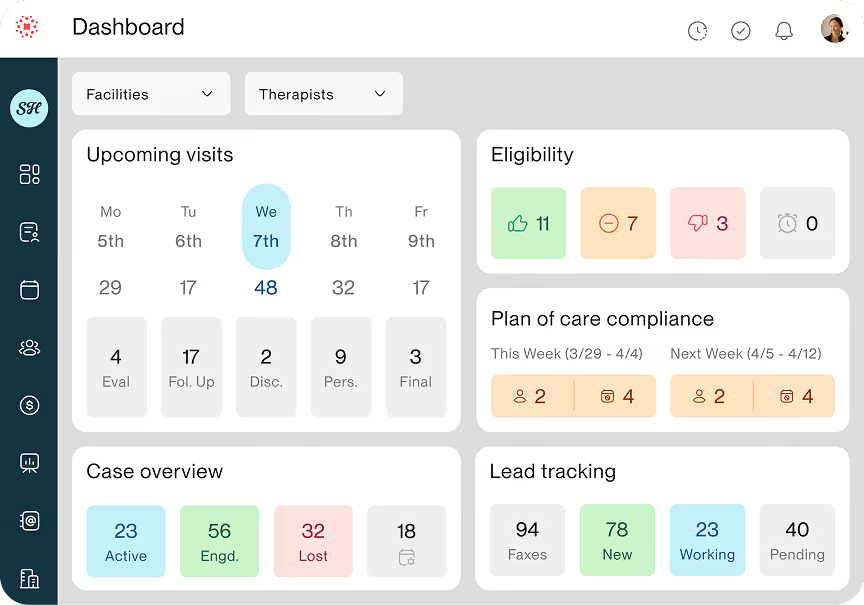
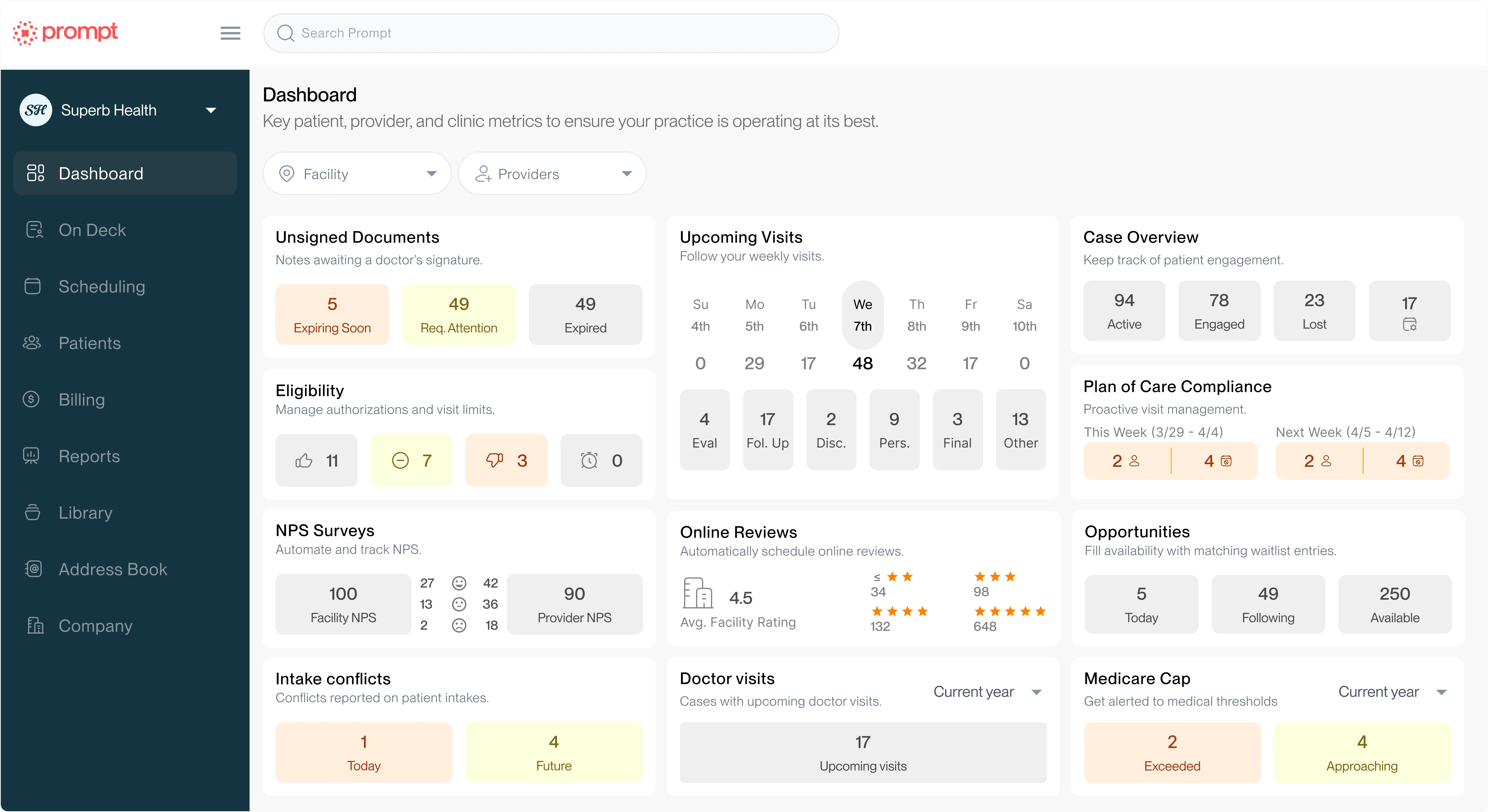
See you guys see you So right here, this is the plan of care compliance. It's on the dashboard. It's telling me this week and next week how many patients [00:31:30] are under scheduled according to what the doctor had put in the documentation. So you can just open this up and see all of those patients. You can see how many times doc wants them coming in this week, when that started, how many more visits they have left, or when that ends.
And then you can see if they've been notified automatically already for this week. Um, and then right here, this is key. You can see that they're eligible for more visits. So we wanna make sure we get them back on the schedule. So again, this is a very cool tool. You can automate it or you can manually go through here if you want, but the automation takes a lot of work off of your, off of your staff
All right. Um, let me get back into it here. Um, Pedro, I want to bring you back into this part of the conversation. Um, talk to me about some other ways that AI and automation can help practices keep their schedule full
Pedro: So we've already hit on the, the foundation, right? Always sort of think about is this even needed?
Because again, AI is a bit of a powerful tool, a little bit of a sledgehammer. So do we need the sledgehammer? Um, and if you do need the sledgehammer, right, things like, well, is something gonna show up? It's really hard to predict. Actually, that's kind of in the name, right? You predict what's gonna happen.
AI, right, machine learning, it's a, it's a prediction engine. So if they might be a no-show, if they might drop off, um, that's something where we have an AI model that'll take a lot of things into account. How far away [00:33:00] the patient i-is based, um, you know, potentially things like weather, right, to try to predict is the person gonna no-show or drop off.
Um, distance from the clinic actually is one of the most predictive elements, right? The further they have to drive, the higher that barrier, that obstacle they have to overcome, right, the more likely it is that they don't, uh, come in for a visit. And good thing to keep in mind for planning purposes or opening new clinics up, right?
Um, and then there are also things like we talked about phone a little bit earlier. Well, sometimes you might get a call into your office, and maybe there's not someone available to pick up the phone. Could be late, they could be busy, right? So that's another thing that we're actively now rolling out and, and testing with folks is, well, could the AI pick up the phone, get that person rescheduled, handle some key questions, uh, and have it integrated really nicely into Prompt so that we can task, uh, for example, people at your clinic to make sure that they follow up if the person had a request that the AI couldn't automatically handle.
Uh, give them notification, so they have visibility into it. Uh, even do simple things just like get those spam calls because apparently a, a crazy number. I don't think anybody's too surprised by this, but a huge number of calls that come in that would have distracted your front desk are just like these spam low-value calls, uh, that kind of just distract and waste people's time.
So another great thing to give to the AI instead of having people deal with that instead. Uh, that's a really great use of the, the sledgehammer, uh, as I say. Um, so those are some, you know, some examples, right? Again, built on top of that foundation of like, do we even need... You know, could we have just helped the [00:34:30] person ahead of time so they don't have to call in, right, to reschedule with the reminders, the automations, the wait list, et cetera, uh, which I won't, uh, repeat, right?
I think, uh, folks did a great job there. But in the case that you need-- do need that scalable, you know, front desk face, you know, that is an option for people, and we do give folks a lot of, uh, control over whether they turn it on. Is it available only after hours? Because we recognize that's also a very sensitive area where part of the, um, deliberate nature of our rollout is to make sure that it's a really great experience.
We never want a patient to have their first impression of your clinic be a non, you know, great one, right? We want to make sure that they're, uh, impressed and they, they get scheduled and they come in for care.
Kevin: I love that. Yeah, it's super important to make sure that the clinic owner, you know, they have control over what is and what is not being done over automation and AI.
So that's a, that's a really great, great point. Thanks for adding that. Um, awesome. So we've covered these four areas where we often see revenue slip through the cracks, um, and shown you some of the ways that Prompt helps. If you do wanna see more, um, we're gonna launch another poll here in a second. But if you wanna see more, um, just let us know.
We'll have someone reach out to you, whether it's for maybe you're a customer and you wanna see a certain feature a little bit that you're not using, um, or you haven't seen-- you've never heard of Prompt, haven't seen it, and you wanna see a full, uh, demonstration, we're happy to do that as well. So, um, I think that poll's gonna launch here in a second.
While you're doing that, um, I wanna transition a little bit and, and [00:36:00] allow some questions. If anyone has any questions, throw them in the chat, um, and I'll try to address what I can. Um, but while we do that, um, Pedro, let me ask you kinda one more question as we wait and see if, if we have any other questions coming in here.
Um, but for-- I want you to expand more, I think AI is just a really big conversation topic. Um, so for chiropractors who are hesitant to use AI in their practice or for their staff, um, what would you want them to understand about how it supports their work without replacing their clinical judgment?
Pedro: You know, so it is very easy, as with any tool, to misuse the tool, right?
So the holding a hammer, uh, doesn't necessarily make you a great carpenter because they're actually really, really, really hard, right? Um, and so when we design features, and I'll use Sidekick as the example just 'cause that one's the one that's been in development for many years now, um, we don't, for example, just jam things in your note, even if we think that they should be there, right?
We wanna have some amount of evidence that you discussed it. And so we like to have the AI feel like it's an extension, you know, and also like this big lever that you get to pull, but that it's also really a reflection of what you were already doing. Uh, and I've had clinicians tell me that, "Oh, you know, I was looking at the Sidekick results, and I realized, um, I didn't spend as much time educating this patient as I normally would.
And if I do, you know, do some description and education, Sidekick will tell me like, 'Oh, yeah, you know?'" And it'll have that section, and it's [00:37:30] reflecting back that, like, there was a gap. 'Cause again, it's not just gonna insert stuff, you know. Again, it's AI, so there's always that edge case where something wacky happens.
But we try very, very hard that it captures what actually happened in that, uh, visit. And so it should really be just showing you what was the clinical judgment, the explanation. How did you communicate things to patients and reflect what you did as a clinician, not be like this replacement to you, not be this thing that's just like throwing, uh, things in.
So when you're thinking about that aspect, your, all these professional abilities you've been honing as, as part of your craft over all these years, if the tool is well designed, it should really capture and reflect that and not feel like a replacement. Just like an opportunity to just make it very easy for you to take the great work you're doing in person with the patient and document it, 'cause documentation is a, a sort of necessary evil, uh, as part of all this clinical care you will deliver.
Kevin: Yeah, I love it. Um, we did get a question, and I think it was answered in the chat by Shelby and Emily, but I would love, um, a chance for you, for maybe Shelby, for you to address it around the kiosk and what is being, um, charged, like when they check in and they're, you know, prompted to make a payment. Um, what are they, what are they paying for?
Shelby: Yeah. So you can, um, you know, if you put in their co-pay or co-insurance or what you estimate they will pay that day, the kiosk will collect, um, in advance for today's visit. But then it will also give them the [00:39:00] option to pay any outstanding balance that they have. Um, so they do have, you know, that flexibility also.
And you can require them to pay their outstanding balance as well, which some of my teams really like.
Kevin: And is that outstanding balance gonna include anything that is still out to insurance?
Shelby: Um, it would be... And correct me if I'm wrong, guys, but that's the patient responsibility, correct?
Emily: Yeah.
Kevin: Okay.
Emily: So it doesn't become a balance until it, like a real balance, until it comes back from insurance.
Yeah.
Kevin: Perfect. Perfect. Thank you. Um, Shelby, one other question I want you to address. You help clinics in onboarding. Um, a lot of people are, um, scared to transition their EHR. It is a big task. What are some of the, um, I guess, tips and tricks that you would tell someone who's thinking about switching to a new EHR, um, and just need some suggestions?
Or maybe setting expectations of what to expect. Talk us through that a little bit.
Shelby: Yeah. I think a couple of things, um, just to keep in mind is- Whatever software you switch to, whether it's Prompt or another software, your workflows are not going to look exactly the same as they did in the software that you're doing.
And so you do have to be open to a little bit of change. Um, your schedule may not look exactly the same, or it may be new for you to collect upfront versus on the back end of the [00:40:30] visit. But, like, you're searching for a new software for a reason. And when you find a software that's working for you instead of against you, you're really gonna find that a lot of the friction that you're experiencing in your operations is gonna go away, and you're gonna clear this runway for your practice to grow and increase revenue without having to, like, add staff or, you know, focus on marketing.
Um-
Kevin: Mm-hmm.
Shelby: Yeah. Those are some of the biggest things that I see.
Kevin: I love it. Thank you so much. Um, we're running out of time. There are a few more questions it seems like coming through about the kiosk and cash. Um, we actually have an, an, you know, a lot of great updates coming out over the next few months that Emily's been working on regarding cash pay services.
They're not out yet, um, but Emily's been working very hard with the, the development team on some really cool updates coming out. We're happy to answer any specific questions related to your clinic and how it might work in a Prompt workflow. Um, if you-- I think that poll already went through, but we're happy to connect with you and schedule a demo.
You can also just visit us online at prompthealth.com, um, and schedule your demo there. Um, but to all the panelists here, thank you so much for your time. Um, we really appreciate it. I love hearing your output on everything. Um, it's really helpful hearing everyone's experience, whether it be as a chiropractor working with our customers in [00:42:00] product, um, the AI side.
It's, it's really great to have this conversation come together. Um, so I just wanna end on that note. Thank you everyone. I really appreciate your time, and I hope everyone has a wonderful rest of your week